

How can light animations follow the body during kneeling?

  • Hi everyone,

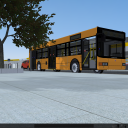
    I’m currently working on the kneeling system of a bus in LOTUS.

    The kneeling itself is working correctly: the bus body moves/tilts down while the wheels remain in their correct position.

    However, I have a problem with some of the light-related animations/objects, for example the turn indicators, high beams and other exterior lights.

    When the body moves during kneeling, these light animations do not seem to follow the body correctly and remain at their original position.

    What is the correct way in the Content Tool to make these lights inherit the movement of the kneeling animation?

    My body animation hierarchy is basically:

    Main → BODY_Ferry → BODY_Kneeling_Tilt → BODY_Kneeling → body meshes

    For normal meshes I can simply place them below the kneeling animation nodes, so they inherit the movement. But I’m not sure how this should be done with LOTUS light animations/effects without breaking their existing functionality.

    Is it possible to make the light objects/animations children of the kneeling animation, or is there another recommended method to make their position follow an animated vehicle body?

    Thanks in advance for your help!


    To clarify: I don't want the kneeling variable to control whether the lights are on or off. I only want the position of the existing light effects to move together with the bus body while keeping their normal light functions unchanged.


    Thank you

  • Hi,

    you can bind lightsources using the button 'Bind to animation' i marked in yellow.

    Then the lights should move correctly with the selected in the animation-tab at the top.


    Also the Content-Tool might not show lightsources moving, however in-game they will.


    Greetings

  • Oh! Although everything ist correct, please do not realize the kneeling as an animation!


    You should manipulate the spring stiffness of the wheels with the script function {wheel}.set_spring_factor(factor). Reduce them at one side and the bus will kneel without any additional animations! ;-)

  • Hi Marcel,

    thank you very much for your explanation about the kneeling system!

    Until now, I had implemented the kneeling by animating the vehicle body. The script progressively calculates the kneeling position, while in the Content Tool the BODY is lowered and tilted towards the door side.

    After your explanation, however, I would like to rebuild it properly using the actual suspension physics through:

    {wheel}.set_spring_factor(factor)

    I am currently developing a Bredamenarinibus M240 used by ACTV in Venice, with the vehicle logic running in LOTUS NG using Rust.

    In my NG script I already access individual wheels, for example:

    vehicle::RoadWheel::get(0, 1)

    vehicle::RoadWheel::get(1, 1)

    I currently use RoadWheel for other physical functions such as braking and traction.

    So I would like to ask:

    In LOTUS NG/Rust, should set_spring_factor() be called directly on the RoadWheel object obtained this way?

    To reproduce the actual side-kneeling behaviour, would it be correct to progressively reduce the spring factor of the front-right and rear-right wheels while leaving the left side unchanged?

    There is also another important feature of this particular bus.

    The Bredamenarinibus M240 buses operated by ACTV in the Lido di Venezia area have to be loaded onto ferry boats. For this reason, in addition to normal kneeling, the vehicle has an opposite function that can raise the entire bus, increasing its ride height to negotiate the ferry loading ramps.

    I have currently implemented this “Ferry/Lift” function as another BODY animation, moving the complete suspended part of the bus vertically upwards.

    What would be the correct way to reproduce this using the actual LOTUS suspension physics?

    Could I raise the complete vehicle by increasing the spring_factor on all four wheels, or is there another function/API intended to change the suspension ride height or equilibrium position?

    Ideally, I would like to reproduce three physical suspension states:

    Kneeling: door side lowered

    Normal: normal driving height

    Ferry/Lift: complete bus raised

    My goal is to remove the artificial BODY animations and let the suspension and vehicle physics produce the actual movement instead.

    Thank you again for your help!

  • Hi! I'm happy that you want to change it!

    In LOTUS NG/Rust, should set_spring_factor() be called directly on the RoadWheel object obtained this way?

    Yes, that same principle like setting the forces of your wheels.


    That sounds very interesting: The best base to simulate something realistic, is knowing how it is realized in Reality. The normal kneeling is usually done by decreasing the pressure in the air spring bellows, so this should be the best way to do so in lotus, too.


    But I have no clue, how the raising functions is realized in reality! ;-) The problem is of course, that you can not increase the pressure limitless, not just due to technical issues, but the hardness of the springs would increase limitless!

  • Hi Marcel!

    Thank you very much for your explanation! 😊

    Regarding the Ferry raising function, I can explain how it works on the real Bredamenarinibus M240 LU used in Venice.

    When the driver activates the Ferry function, the pneumatic suspension system raises the entire bus body simultaneously on all wheels, keeping the vehicle approximately level. This function is used to increase ground clearance when boarding or leaving ferries.

    As far as I understand, the system increases the air pressure in the suspension bellows to raise the body, while the height control system regulates its final position.

    This brings me to another technical question about LOTUS NG/Rust.

    Besides RoadWheel.set_spring_factor(), is there a way to dynamically modify the suspension's resting position, spring preload, or equilibrium height?

    My concern is that simply increasing the spring factor to raise the bus could make the suspension excessively stiff, as you correctly pointed out.

    Ideally, I would like to simulate three suspension states:

    Normal driving height.

    Lateral kneeling, lowering one side of the bus.

    Ferry mode, raising the entire body simultaneously on all wheels.

    I would really like to achieve these movements through the actual suspension physics rather than body animations.

    Does the current LOTUS NG API provide a way to do this, or would an additional function be necessary?

    Thank you again for your help.

  • Newly created posts will remain inaccessible for others until approved by a moderator.

    The maximum number of attachments: 5
    Maximum File Size: 500 kB
    Allowed extensions: bmp, cfg, ini, jpeg, jpg, lct, ldl, llg, lob, log, lpmtl, lptmt, ltx, pas, pdf, png, railtrack, rar, txt, veh, wav