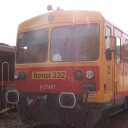
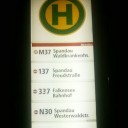
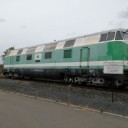
I added a new version, it has 2+2 new camera positions (more left and more right, to look into intersections) and added support for axis `ThrottleBrakeWithoutMax`, though this needs further testing to see if the deadzone is sufficiant for neutral.
Posts by Bzmot332
-
-
The same thing happens to me, so I'm pretty sure it has a thing to do with the servers,
-
This is the commentary thread concerning addon: Ganz ICS tram from Budapest
Some pictures:
Showroom thread: https://www.lotus-simulator.de…o-scripts-for-lotus-ng%2FPlease note:
I am/We are receptive to every kind of constructive feedback. It must not hurt me/us and must not diminish my/our work.
Please write your feedback to my/our work so, as to be
- precise and clear, thus not vague or emotional
- analytical and rational, thus properly researched and convenient, not on impulse
- solution-orientated, thus, if applicable, attached with counterproposals, consequences and implications.
Since I am/we are glad about any kind of compliment of my/our work, a balanced ratio of positive and negative feedback is greatly appreciated.

-
Ganz ICS (officially CSMG2) articulated tram
Involved persons:
Base model: Szabó's workshop
Additional models, converting, sounds, scripting: Bzmot332
Details:
I've been working on this tram for a while, but in the last half year I hadn't make much progress - besides porting its whole scripting system to Rust for LOTUS-ng. So besides a few things missing (mirrors, destination displays/tables, additional dashboard variants, only first right door handling...etc), I publish it instead of sitting on it forever.
The tram has a few repaints (mostly made by Szabó's workshop), a few variables for the inners (different seats, door buzzer (models and scripts), handrails, textures for walls, ceiling and floor, old bulb and newer fluorescent style lights). Most of the things work on it.
How to use:
Noone ever reads my readmes, so I won't bother writing a 5-10 page manual in dual languages, so here's in TLDR style.
The tram uses default hotkey bindings, though only the door handling needs a bit detailing. The key handles:
- Door side selector (3-state switch, can be clicked with left/right mouse button or via hotkeys DoorSideLeft and DoorSideRight) - doors can only opened if its in proper selection
- Door open switches (one for each side, only works if the side is selected) - via mouse button or DoorReleaseLeft or DoorReleaseRight)
- Door closing (this starts the buzzer then automatically closes doors - via mouse or DoorAllClose)
Doors can only be operated if the reverser is not in neutral. Doors can be closed by many ways (switching the side selector from side to side, normal closing, putting the reverser to neutral then to anywhere...etc, like in real life). Passengers get on and off. If I remember correctly, I haven't still made the RC scripts (so no AI/multiplayer at the moment).
The reverser has 3 forward positions, each with different maximum pull force. The controller has a dedicated startup position, after which you can push it forward (to series last position, then to paralel). Joystick axises are also supported (startup position is at Throttle = 5%) via Throttle and Brake levelers.
Pictures/videos:
On how to operate the tram:
Additional pictures:
Link to commentary thread:
Vehicle - Ganz CSMG2 tram (also scripts for LOTUS ng)
Link to item in Steam Workshop:
Since uploading via CT hasn't worked for a while, I can only give a mega link for this:
https://mega.nz/file/zY9DxISY#…iVXh50NPxV0gmMGvc7Fm7MM3Y
(This is v1.1, added extra camera views and support for `ThrottleBrakeWithoutMax` axis, though this needs further testing)
LOTUS-ng script - also via mega:
https://mega.nz/file/aUlyBRLQ#…mjMqzCDohfUIllbXdUS5s23Vg
To make it work, copy the script.wasm file to C:\Users\YOUR_NAME\AppData\Roaming\LOTUS-Simulator\scripts\user\5748663\916781383 \script.wasm or wherever your LOTUS folder is. LOTUS-ng uses this AppData folder for scripts and stuff, so you have to put it here, to overwrite the non-existing default script. The user folder may not be present. The user and content ID is for this project (ICS by Bzmot332), so don't change those values otherwise it simply won't load it.
Dinamic texture changes don't work, so most of the inners are black, but the outer and cab loads just fine. Most of the things work (to use the pantograph, press E), but running sounds are a bit weird, probably due to the NG.
-
Concerning the sounds:
Oh, this could be right, I will check this!
Here's a little clue about what I'm talking about the sounds.
Here's my tram at starting in the old engine:
And here's the ported version in NG:
[MEDIA:https://youtu.be/-93xzN_-Vsk?t=4]
I didn't alter the scripts for calculating sound curves and volumes, and I set all sound variables (so for all 4 bogies I set the electric motor and running sounds). -
I figured out the GTN only changes the nighttexture brightness from script, but I still would like to know, if it's possible to change textures from script at the moment, or is this a future feature?
-
I see that in the GTN texture changes are working (at least the door warning light seems to change texture). These were made with `GetTextures` with the old scripting system. May I know what's the current method for setting the texture IDs?
-
Quote
You may use any string, especially those which you have used in the ContentTool.
Wait, so if I only use an action for some clickable elements and add them a custom name, I don't have to register that action? So this action register function is more fore things like fixed keys for given inputs?
A few other things got me thinking. What's the best practise for polling the inputs when handling user inputs? At the moment I made something like this (very exaggerated example):
Display MoreCode- let state = action::state("something1");
- if state.kind.is_just_pressed() { do_something_for_1; }
- let state = action::state("something2");
- if state.kind.is_just_pressed() { do_something_for_2; }
- let state = action::state("something3");
- if state.kind.is_just_pressed() { do_something_for_3; }
- // and so on
...and I actually handle all of the user inputs in both cockpits like this. I guess I have to call action::state("xyz") in every tick for every input, since this function returns only data for the given input.
Is there any better way for this, or this is the correct way?
Also I noticed the GT6N only has running sounds on the first module, and I also noticed my tram, which also has 3 modules and plays all the bogies, sounds very...strange. Am I right if I think at the moment all looping sounds are started at exactly the same time and that's the reason for the ghostly effect for running/motor sounds? -
I'm starting to figure out things, but another, full random thing came across:
I looked at the function declaration and it seems this push function always needs two arguments. Is there a way to _not_ add a key for a custom bind? Like a cab has dozens of clickable elements, and I don't think the intended usage is to have millions of keyboard bindings after installing a few vehicles. Or is this a temporary state until users can setup their own bindings?
-
I have one issue I cannot solve, and it's driving me nuts: how should we implement global variables? I'm not talking about public vars (which are later used by sounds/animations/lights...etc), I mean inner variables that are used in multiple files (like electronics, cockpit, doors...etc).
Should I just don't care and put all of them as public vars? At the moment I did, so I can continue porting the script, but I'd like to know if there's any other good practice.
Also one thing I'd like to ask: is there any way to alter texture maps, like with `GetTextureIndex` with the old engine? Is there any implemented way for that?
-
Also some things I forgot to ask which I don't really find in the docs:
What's the "main" script file the compiler looks for, `lib.rs` (like the Main.pas in the old version)? How do I link the files? I see in the TG6N that in the lib.rs file all other used files are added as modules (pub mod xyz), but I also see that in every script file, other script files are loaded with the use directive.
Do we have to declare public variables like in the old version (PUB_VARS) or we just start to use them with get_var and set_var? The latter seems to be the case as I could add some variables to my tram. But there's some info in one of the docs.io page, stating an example like:
impl PublicVarType for bool. How can we make non-public variables? With the directive let?
Are there any summary about the usable base variables, structs...etc? Is the docs.io page the correct way to look for these, like this page for the `lotus-extra` crate? I looked at most of these and I still cannot find stuff used in the GT6N, like lotus_rt_extra::cockpit_simple::...
-
Hello!
Thanks for the response!
I've seen this information page, I installed rust and the lotus-sc based on it.Also, based on it I can use the basic lotus-script crate. But how can I use the other crates (if I'm right) like lotus-rt-extra and lotus-rt? It seems to be, looking at the GT6N scripts, that many default things are collected from them.
I see on the crates.io page, that there are other crates with the name lotus-*. I guess the ones for LOTUS are the ones made by Ekranos and you, right? Which one of them do I/we need for vehicle and other objects? lotus-extra and lotus-rt are my guesses.
I tried to install `lotus-rt`, but it didn't work out:I also tried to add lotus-rt-extra to my project but that also didn't work:
How could I install these crates?
-
I'm trying to figure out the new scripting system, which is not easy since the only documentation about the vehicle scripts...are the scripts themselves, which literally have no comments in it. Anyway, since I cannot find out how could I resolve the dependency problems, I tried to build the given GT6N scripts, thinking surely I forget something. Well nope, or I don't know:
Even the given GTN cannot be built (https://github.com/Oriolus-Sof…t6n/tree/observer_version). What am I missing, how could I reach these crates/whatever these are called (lotus_extra, lotus_rt_extra...etc)?
-
Dear developers,
I've been struggling with the damn terrain for almost 3 years in my underground maps and could not come up with any solution on my own.
The problem is shown below:
There's nothing that helps. Recreating all tiles in all levels do not work, these artifacts always appear on the same place.
Since this looks like a not solvable problem, WOULD IT BE POSSIBLE to remove the vertical planes from the LOD model of the terrains? It literally serves no purpose in LOTUS (even if the terrain can be seen from further than the terrain can be loaded, it looks stupid with these walls, but it especially screws up underground maps, since these allways start from 0 meter below...)
-
After a year or so I opened the map editor, to clean up the terrain on my metro map. Guess what, after 2 years of trying, it's still not working...
I added subterrains on level 0 to get the earth out of the way. I regenerated levels and terrain on levels 0, -1, -2 a hundred times.
WHAT THE ACTUAL F.CK SHOULD I TRY AFTER 2 GOD DAMN YEARS?
There's nothing about this low resoultion terrain in any lexikon article. There's no error message, I only save the map after in editor the wireframe mode is off, so the terrain should be generated. Every god damn time I regenerate the terrain, other tiles are faulty. And these are faulty tiles because they appear in low resoultion, flickeringh like hell...
-
Quote
(...) But sadly, the communications culture of the LOTUS team lacks any understanding of this desire.
Well, that's the only thing for sure.
I was the first person to make publish a mod tram for the whole god damn game (Ezres/BKV V) - in the year of the release of LOTUS, I published the first suburban train (in old Óbuda, which is not really finished, but the train for it is), I published the first underground (MFAV), I published the first "heavy metro/U-bahn". I don't want any fame or different handling, all I want is an answer on my freaking bug reports (tile border terrain errors, flickering lights, not working mirrors from one day to another without changing the vehicles, changing light set of objects from one day to another yet again without changing anything). You know what I got? You are damn right, not a single f.cking answer.That's all I can comment on the communication of the devs...
-
Alright, it looks like all maps are loaded on the same world at the moment, that's the reason for the empty tiles at concurring maps.
Two things I noticed though (I suppose the development is just not at that step at the moment): frogs are not generated/shown...
...and only level=0 is shown, underground parts are not:
-
Ahh, I didn't realize there's a log for the NG version (in the logs folder I didn't find anything).
Though I don't really see any error message in them, here they are:
Code: simulator.log- 2024-04-15T15:17:18.846429Z INFO simulator: Running version 'e8176a63888600c51f5cbdc335c3da40860d6951' of 'master'
- 2024-04-15T15:17:18.849418Z INFO bevy_winit::system: Creating new window "App" (0v1)
- 2024-04-15T15:17:18.999582Z INFO wgpu_hal::vulkan::instance: Debug utils not enabled: debug_utils_user_data not passed to Instance::from_raw
- 2024-04-15T15:17:19.015009Z INFO wgpu_core::instance: Adapter Vulkan AdapterInfo { name: "NVIDIA GeForce RTX 3060 Ti", vendor: 4318, device: 9417, device_type: DiscreteGpu, driver: "NVIDIA", driver_info: "545.92", backend: Vulkan }
- 2024-04-15T15:17:19.015051Z INFO bevy_render::renderer: AdapterInfo { name: "NVIDIA GeForce RTX 3060 Ti", vendor: 4318, device: 9417, device_type: DiscreteGpu, driver: "NVIDIA", driver_info: "545.92", backend: Vulkan }
- 2024-04-15T15:17:19.674515Z INFO bevy_diagnostic::system_information_diagnostics_plugin::internal: SystemInfo { os: "Windows 10 Pro", kernel: "19045", cpu: "13th Gen Intel(R) Core(TM) i5-13600K", core_count: "14", memory: "15.8 GiB" }
- 2024-04-15T15:17:19.770100Z INFO naga::back::spv::writer: Skip function Some("sample_input_3x3_tent")
- 2024-04-15T15:25:54.081885Z INFO bevy_window::system: No windows are open, exiting
- 2024-04-15T15:25:54.082368Z INFO bevy_winit::system: Closing window 0v1
Code: simulator.json.log- {"timestamp":"2024-04-15T15:17:18.846451Z","level":"INFO","fields":{"message":"Running version 'e8176a63888600c51f5cbdc335c3da40860d6951' of 'master'"},"target":"simulator"}
- {"timestamp":"2024-04-15T15:17:18.849426Z","level":"INFO","fields":{"message":"Creating new window \"App\" (0v1)"},"target":"bevy_winit::system"}
- {"timestamp":"2024-04-15T15:17:18.999591Z","level":"INFO","fields":{"message":"Debug utils not enabled: debug_utils_user_data not passed to Instance::from_raw","log.target":"wgpu_hal::vulkan::instance","log.module_path":"wgpu_hal::vulkan::instance","log.file":"C:\\Users\\Mochida Yuka\\.cargo\\registry\\src\\index.crates.io-6f17d22bba15001f\\wgpu-hal-0.19.3\\src\\vulkan\\instance.rs","log.line":341},"target":"wgpu_hal::vulkan::instance"}
- {"timestamp":"2024-04-15T15:17:19.015018Z","level":"INFO","fields":{"message":"Adapter Vulkan AdapterInfo { name: \"NVIDIA GeForce RTX 3060 Ti\", vendor: 4318, device: 9417, device_type: DiscreteGpu, driver: \"NVIDIA\", driver_info: \"545.92\", backend: Vulkan }","log.target":"wgpu_core::instance","log.module_path":"wgpu_core::instance","log.file":"C:\\Users\\Mochida Yuka\\.cargo\\registry\\src\\index.crates.io-6f17d22bba15001f\\wgpu-core-0.19.3\\src\\instance.rs","log.line":771},"target":"wgpu_core::instance"}
- {"timestamp":"2024-04-15T15:17:19.015054Z","level":"INFO","fields":{"message":"AdapterInfo { name: \"NVIDIA GeForce RTX 3060 Ti\", vendor: 4318, device: 9417, device_type: DiscreteGpu, driver: \"NVIDIA\", driver_info: \"545.92\", backend: Vulkan }"},"target":"bevy_render::renderer"}
- {"timestamp":"2024-04-15T15:17:19.674525Z","level":"INFO","fields":{"message":"SystemInfo { os: \"Windows 10 Pro\", kernel: \"19045\", cpu: \"13th Gen Intel(R) Core(TM) i5-13600K\", core_count: \"14\", memory: \"15.8 GiB\" }"},"target":"bevy_diagnostic::system_information_diagnostics_plugin::internal"}
- {"timestamp":"2024-04-15T15:17:19.770110Z","level":"INFO","fields":{"message":"Skip function Some(\"sample_input_3x3_tent\")","log.target":"naga::back::spv::writer","log.module_path":"naga::back::spv::writer","log.file":"C:\\Users\\Mochida Yuka\\.cargo\\registry\\src\\index.crates.io-6f17d22bba15001f\\naga-0.19.2\\src\\back\\spv\\writer.rs","log.line":1948},"target":"naga::back::spv::writer"}
- {"timestamp":"2024-04-15T15:25:54.081921Z","level":"INFO","fields":{"message":"No windows are open, exiting"},"target":"bevy_window::system"}
- {"timestamp":"2024-04-15T15:25:54.082389Z","level":"INFO","fields":{"message":"Closing window 0v1"},"target":"bevy_winit::system"}
-
I have some problems with the new Unity beta version. In the upper-left menu as I select _my_ maps, they don't really get loaded.
On Óbuda, I only get a few loaded tiles, like this:
All the surrounding tiles are missing. On the metro/underground/U-Bahn maps I cannot even see anything really. On the M1 map I only see some catenary splines and that's it, not even the objects from the same level show up. On the M2 map I see absolutely nothing.
My other concern is that if I open a map that's in my contents folder, they usually don't load, instead they load other parts from other maps. A friend of mine works on a tram line on a completely different map, that tram line is a few kilometers away from the M1 metro line. If I load my M1 map, I don't see my map, but I do see tracks from my friend's map.
(From discord group screenshots I know that at least parts of my maps can be loaded, and also I can see Diorama/Berlin just fine, so I guess this is an issue with local, none-steam-downloaded maps)
-
Quote
For now, the only thing you can do is sit and wait untill the unity update is being released...
But this is NOT a performance issue, the other engine wouldn't solve it. It's always at the same place at every time, doesn't matter if you spawn there or slowly approach it...